Volunteer and Non-Staff Log in Help*
Welcome to LearningSpace!
To access LearningSpace and other Peace Corps systems you must have an account with login.gov. Watch the short video on how to create a Login.gov account, then use the sections below to make sure you have everything set up.
Set up your Login.gov account with the email address Peace Corps has on file. Important notes:
- Your LearningSpace email and your Login.gov email must match. This matching email is what links your accounts and allows access.
- You must set up at least two (preferably three) authentication methods in Login.gov. This prevents login issues if you lose access to one method (for example, if your U.S. cell phone number changes or your .edu email is deactivated).
- Peace Corps staff cannot access or assist with Login.gov accounts because Login.gov is managed by the U.S. General Services Administration.
- Please use the troubleshooting section below for step-by-step instructions.
Sign In to LearningSpace
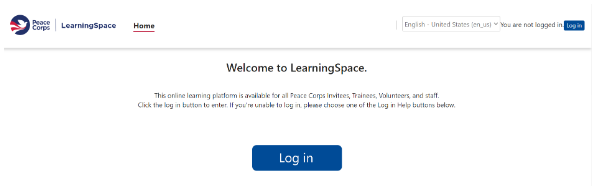
2. On the USDA eAuthentication page, select Peace Corps Volunteers and Non Staff.
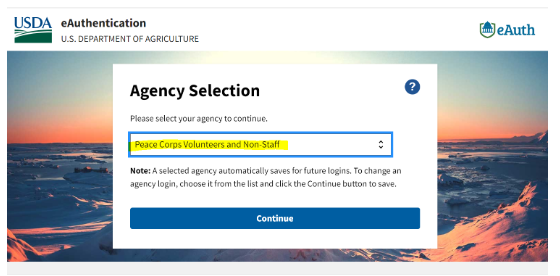
3. Select Continue, then select Login.gov.
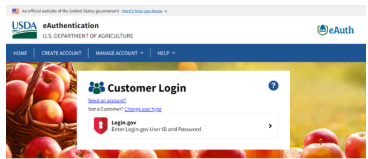
4. Enter your Login.gov information and complete authentication.
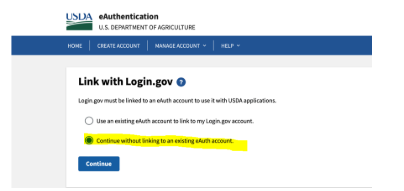
5. If asked to link an account, select Continue without linking to an existing eAuth account and enter your name.
6. After sign in, you will return to the LearningSpace dashboard.
Open LearningSpace
On a phone or tablet, continue in Safari, Edge, Chrome, or another browser.
Troubleshooting Common Login.gov Issues: Choose the one that matches your situation
| If
this is happening…
| Do this… |
➜ You do not have a login.gov account | Create a new login.gov account | Click here |
➜ You do have a login.gov account | Ensure your LearningSpace email matches your login.gov email. To change your email | Click here |
➜ Your LearningSpace email doesn’t match your
Login.gov email. | Update your email address in login.gov (Time: 5 mins) | Click here |
➜ You need to update/ change the authentication method on my account login.gov account | Change your authentication methods on my account before your lose access. | Click here |
➜ You tried to change your email or you cannot log in and lost authentication access | Delete your login.gov account (Time: takes up to 2–3 weeks) | Click here |
➜ You want to keep your Login.gov email and update your Peace Corps email, you can request Business Services to make the change. Processing time is typically up to 3 days. | Instructions: Copy, paste, edit, and send the message below to Business Services. Be sure to update the placeholders with your correct information. To: pchelpdesksupport@peacecorps.gov Hello Business Services, |
Why Your Account May Be Suspended
You may also see a suspension if:• You are near your close‑of‑service date
• You are returning to service (including Response service)
• You had an extended leave while in service
Volunteer LearningSpace access normally continues for one year after your close‑of‑service date. However, your account may be suspended earlier when records are updated in other Peace Corps systems.
Do you need help after signing in?
1. LearningSpace technical problems
Email LearningSpaceSupport@peacecorps.gov for help with system errors or features that are not working.
2. Course or enrollment questions
Contact the course owner first for questions about enrollment, course content, assignments, or due dates.