FAQs
- Site:
- LearningSpace
- Course:
- LearningSpace
- Book:
- FAQs
- Printed by:
- Date:
- Thursday, November 19, 2026, 2:12 PM
Table of contents
- Introduction
- ● How do I set up my Login.gov account for use with LearningSpace?
- ➜ How do I create a login.gov account?
- ➜ I have login.gov but I can't sign into LearningSpace
- ➜ My LearningSpace email doesn’t match my Login.gov email.
- ➜ I need to update/ change the authentication method on my account login.gov account
- ➜ I tried to change my email but cannot log in and lost authentication access
- ➜ I want to keep my Login.gov email and update my Peace Corps email
- ● Why is my account suspended?
- ● Who do I contact for additional support?
Introduction
Welcome to the LearningSpace Support Guide
This guide was created to help you quickly resolve common LearningSpace and Login.gov issues on your own. Many access problems can be solved by following the troubleshooting steps and FAQs included in this resource. We encourage you to review the information carefully before submitting a support request, as doing so may save you time and help you regain access more quickly.
Please note that while this guide can help you identify solutions to common problems, some issues require assistance from the appropriate support team. If you are unable to resolve your issue using the information provided, contact the appropriate resource listed to the right.
Use this guide as your first stop for troubleshooting, and when additional assistance is needed, contact the appropriate support resource to ensure you receive the fastest and most accurate help.
● How do I set up my Login.gov account for use with LearningSpace?
- Your LearningSpace email and your Login.gov email must match. This matching email is what links your accounts and allows access.
- You must set up at least two (preferably three) authentication methods in Login.gov. This prevents login issues if you lose access to one method (for example, if your U.S. cell phone number changes or your .edu email is deactivated).
- Peace Corps staff cannot access or assist with Login.gov accounts because Login.gov is managed by the U.S. General Services Administration.
- Please use the troubleshooting section below for step-by-step instructions.
To access LearningSpace and other Peace Corps systems you must have an account with login.gov. Watch the short video on how to create a Login.gov account, then use the sections below to make sure you have everything set up.
Once your Login.gov account is activated, use the below instructions when logging into LearningSpace.
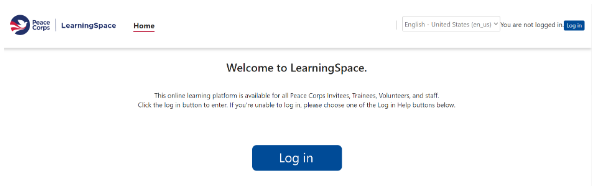
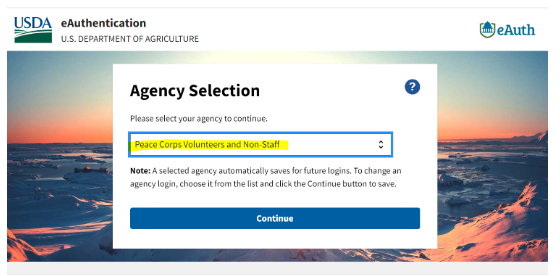
2. On the USDA eAuthentication page, select Peace Corps Volunteers and Non Staff.
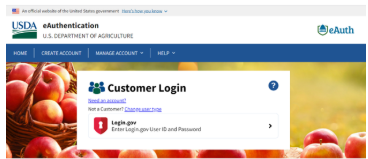
3. Select Continue, then select Login.gov.
4. Enter your Login.gov information and complete authentication.
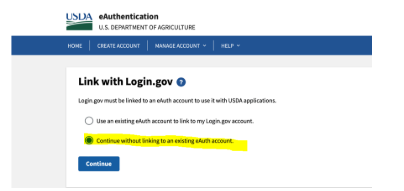
5. If asked to link an account, select Continue without linking to an existing eAuth account and enter your name.
6. After sign in, you will return to the LearningSpace dashboard.
Open LearningSpace
On a phone or tablet, continue in Safari, Edge, Chrome, or another browser.
➜ I have login.gov but I can't sign into LearningSpace
Ensure your LearningSpace email matches your login.gov email. To change your email | Click here
➜ My LearningSpace email doesn’t match my Login.gov email.
Update your email address in login.gov (Time: 5 mins) | Click here
➜ I need to update/ change the authentication method on my account login.gov account
Change your authentication methods on my account before your lose access. | Click here
➜ I tried to change my email but cannot log in and lost authentication access
Delete your login.gov account (Time: takes up to 2–3 weeks) | Click here
➜ I want to keep my Login.gov email and update my Peace Corps email
Instructions: Copy, paste, edit, and send the message below to Business Services. Be sure to update the placeholders with your correct information.
To: pchelpdesksupport@peacecorps.gov
Subject: Business Services: Update Peace Corps Email Address Request to Requeue EmailHello Business Services,
My name is [insert first and last name].
I am an [Invitee/Volunteer]in [insert country].
I need to update my current Peace Corps email address from [insert current email] to [insert new email] so I can access Peace Corps systems.
Please requeue my email.
Thank you,[Signature]
● Why is my account suspended?
You may also see a suspension if:
• You are near your close‑of‑service date
• You are returning to service (including Response service)
• You had an extended leave while in service
Volunteer LearningSpace access normally continues for one year after your close‑of‑service date. However, your account may be suspended earlier when records are updated in other Peace Corps systems.
➜ How do I access a suspended account?
Why Your Account May Be Suspended
Volunteer LearningSpace access normally continues for one year after your close‑of‑service date. However, your account may be suspended earlier when records are updated in other Peace Corps systems.
You may also see a suspension if:
• You are near your close‑of‑service date
• You are returning to service (including Response service)
• You had an extended leave
Instructions: Copy, paste, edit, and send the message below to LearningSpace Support. Be sure to update the placeholders with your correct information.
To: LearningSpaceSupport@peacecorps.gov
Subject: My LearningSpace Account is Suspended
Hello LearningSpace Support,
I received a message that my LearningSpace account is suspended. Please review my account and let me know when I can access LearningSpace again.
Full name: [first and last name]
Country of service: [country]
LearningSpace email: [email address]
Service status: [Invitee, Volunteer, returning Volunteer, or Returned Volunteer]
Close-of-service date (if applicable): [date]Thank you,
[First and last name]
● Who do I contact for additional support?
If you have attempted to solve the issue yourself and are still running into the same issue, you may need to reach out to support. Use the information below to contact the correct support line.
Login.gov Support
Login.gov can assist with:
- Sign-in problems
- Authentication method issues
- Account recovery
- Login.gov account access issues
Phone: (844) 875-6446
Important: Peace Corps and LearningSpace staff cannot access, view, or make changes to your Login.gov account.
LearningSpace Support
LearningSpace Support can assist with:
- LearningSpace account access issues
- Suspended LearningSpace accounts
- Technical problems within LearningSpace
- System errors or features that are not functioning properly
Email: LearningSpaceSupport@peacecorps.gov
Business Services
Business Services can assist with:
- Updating your Peace Corps email address
- Requeuing your email after an address change
Email: pchelpdesksupport@peacecorps.gov
Important Information About Course Support
If your question is related to a specific course, such as enrollment, assignments, deadlines, course content, or course requirements, you should contact the course designer or course owner directly. In most cases, the course designer is a Peace Corps employee, and their contact information can be found on the right side of the course's main page within LearningSpace.
➜ LearningSpace technical problems
Email LearningSpaceSupport@peacecorps.gov for help with system errors or features that are not working.