FAQs
● How do I set up my Login.gov account for use with LearningSpace?
- Your LearningSpace email and your Login.gov email must match. This matching email is what links your accounts and allows access.
- You must set up at least two (preferably three) authentication methods in Login.gov. This prevents login issues if you lose access to one method (for example, if your U.S. cell phone number changes or your .edu email is deactivated).
- Peace Corps staff cannot access or assist with Login.gov accounts because Login.gov is managed by the U.S. General Services Administration.
- Please use the troubleshooting section below for step-by-step instructions.
To access LearningSpace and other Peace Corps systems you must have an account with login.gov. Watch the short video on how to create a Login.gov account, then use the sections below to make sure you have everything set up.
Once your Login.gov account is activated, use the below instructions when logging into LearningSpace.
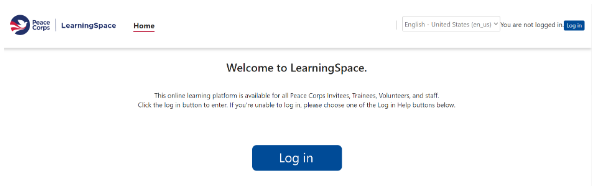
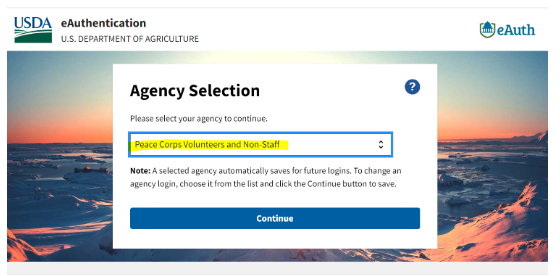
2. On the USDA eAuthentication page, select Peace Corps Volunteers and Non Staff.
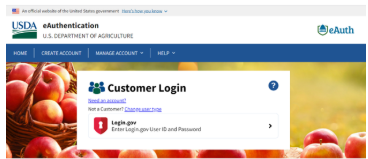
3. Select Continue, then select Login.gov.
4. Enter your Login.gov information and complete authentication.
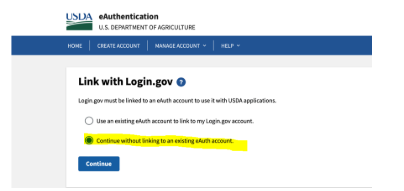
5. If asked to link an account, select Continue without linking to an existing eAuth account and enter your name.
6. After sign in, you will return to the LearningSpace dashboard.
Open LearningSpace
On a phone or tablet, continue in Safari, Edge, Chrome, or another browser.